















USB Connectors for Smartphones: Understanding the Different Types

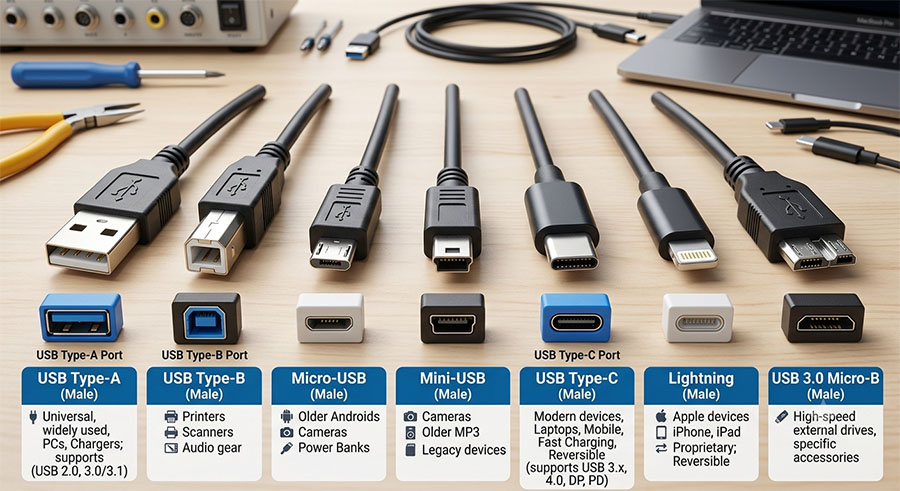
USB connectors have evolved significantly over the years, becoming faster, more durable, and capable of handling charging, data transfer, video output, and even external accessories. If you’re repairing a smartphone or simply looking for the right cable or replacement charging port, it’s important to understand the different types of USB connectors used in mobile devices.
In this guide, we’ll explore the most common USB connectors found in smartphones and explain their differences.
Why Are USB Connectors Important?
The USB port on your smartphone does much more than charge the battery. It is responsible for:
- Charging the device
- Transferring files between devices
- Connecting accessories
- Fast charging support
- Video output on supported models
- USB OTG (On-The-Go) functionality
A damaged charging port can prevent all of these functions from working properly.
USB Type-C
USB Type-C has become the universal standard for modern smartphones.
It features a reversible connector, meaning it can be inserted in either direction, making it much more convenient than older USB designs.
Advantages
- Reversible design
- Faster charging speeds
- High-speed data transfer
- Supports USB Power Delivery (USB PD)
- Compatible with video output (DisplayPort Alt Mode)
- Supports external storage, keyboards, and monitors
Today, most Samsung Galaxy, Google Pixel, Xiaomi, Motorola, OnePlus, Sony, and many other Android smartphones use USB Type-C.
Even newer iPhone models have transitioned to USB-C, making it the most widely adopted mobile connector.
Micro USB
Before USB-C became the industry standard, Micro USB was the most common charging connector for Android devices.
Although it is still found on older smartphones and many budget electronics, it is gradually disappearing from modern devices.
Characteristics
- Smaller than Mini USB
- Non-reversible connector
- Supports charging and data transfer
- Available in USB 2.0 and limited USB 3.0 versions
Micro USB ports are also common on Bluetooth speakers, power banks, wireless headphones, and other accessories.
Mini USB
Mini USB was popular before Micro USB became widespread.
It was commonly used in:
- Early smartphones
- Digital cameras
- MP3 players
- GPS devices
Today, Mini USB is considered obsolete and is rarely found on current electronics.
Apple’s Lightning Connector
For many years, Apple used the proprietary Lightning connector on iPhones, iPads, and accessories.
Lightning offered a reversible design long before USB-C became common and supported charging, data transfer, and accessory connectivity.
Although Apple has now adopted USB-C on its latest iPhones, millions of Lightning devices remain in use worldwide.
USB 2.0 vs USB 3.0 vs USB 3.2
The connector shape isn’t the only difference. USB standards also determine data transfer speed and charging capabilities.
USB 2.0
- Up to 480 Mbps
- Suitable for basic charging and file transfers
USB 3.0
- Up to 5 Gbps
- Faster data synchronization
- Improved power efficiency
USB 3.2
- Up to 20 Gbps (depending on configuration)
- Ideal for large file transfers
- Better support for high-resolution video and external storage
Many smartphones use USB-C while supporting different USB versions, depending on the device model.
What Is USB OTG?
USB On-The-Go (OTG) allows a smartphone to function as a host device, enabling it to connect directly to peripherals without needing a computer.
With OTG, you can connect:
- USB flash drives
- External SSDs
- Keyboards
- Mice
- Game controllers
- Card readers
- Digital cameras
Most modern Android smartphones with USB-C support OTG functionality.
Common Charging Port Problems
The USB charging port is one of the most frequently replaced smartphone components.
Common issues include:
- Loose charging cable connection
- Phone not charging
- Slow charging
- Intermittent charging
- Broken internal pins
- Dust or lint blocking the connector
- Water damage
- Corrosion
In many cases, a professional replacement charging port restores full functionality.
How to Protect Your Charging Port
To extend the lifespan of your USB connector:
- Keep the port clean and free of dust.
- Avoid forcing the cable into the connector.
- Use certified, high-quality charging cables.
- Disconnect the cable carefully instead of pulling on the cord.
- Keep the phone away from moisture and liquids.
- Replace damaged cables before they damage the charging port.
Proper care can significantly reduce wear and prevent costly repairs.
Choosing the Right Replacement Charging Port
If your smartphone requires a charging port replacement, always ensure the replacement part is compatible with your exact model.
When purchasing replacement components, look for:
- Original or premium-quality parts
- Correct USB connector type
- Reliable charging performance
- Stable data transfer
- Accurate fit for your smartphone model
Using high-quality replacement parts helps ensure long-lasting performance and minimizes the risk of future charging issues.
Final Thoughts
USB technology has evolved from Mini USB and Micro USB to the versatile USB Type-C connector, offering faster charging, higher data transfer speeds, and greater convenience. Understanding the differences between USB connector types can help you choose the correct cables, accessories, and replacement parts for your device.
Whether you’re repairing a smartphone or simply replacing a worn charging port, selecting the right USB connector is essential for maintaining reliable performance and extending the life of your mobile device.